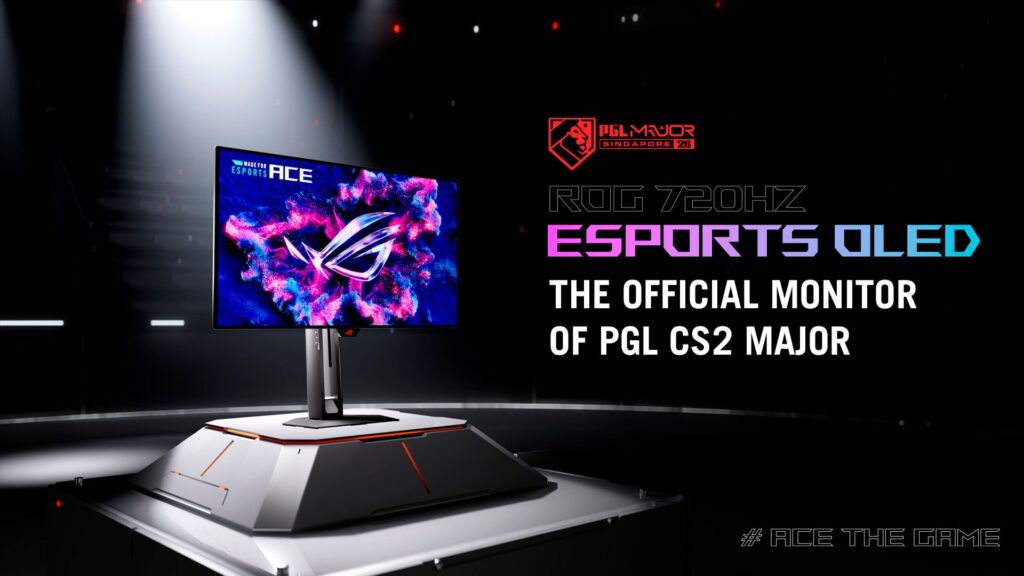
ASUS has moved its fastest OLED gaming monitors from preview to availability. The company announced on October 28 that the 24.5-inch ROG Swift OLED PG259QWS Ace and ROG Strix OLED XG259QWPG Ace are joining its esports display lineup, with U.S. prices of $1,099 and $699 respectively.
The flagship PG259QWS Ace reaches 720Hz at 1920×1080 and uses DisplayPort 2.1 UHBR20. The less expensive XG259QWPG Ace tops out at 540Hz and uses DisplayPort 1.4 with Display Stream Compression. Both use the same glossy Tandem WOLED panel design, quote a 0.02ms gray-to-gray response time and target competitive players rather than shoppers looking for a large, high-resolution general-purpose monitor.
The headline number is impressive, but 720Hz is not automatically better for every game or PC. Buyers need to consider the 1080p resolution, the frame rates their system can sustain and whether esports motion clarity is worth paying more than many 4K OLED monitors cost.
Two 24.5-inch OLED monitors, two speed targets
The official ASUS announcement describes both models as 24.5-inch, 16:9 esports monitors with a native 1920×1080 resolution. They share a TrueBlack Glossy Tandem WOLED panel, 99.5% DCI-P3 coverage, true 10-bit color and factory calibration with a claimed Delta E below 2.
ASUS rates peak HDR brightness at up to 1,700 nits, although it notes that peak brightness can vary with color pre-calibration. The company lists a typical contrast ratio of 1,500,000:1 and a 0.02ms gray-to-gray response time. Those are manufacturer specifications, not measurements from independent testing.
The main performance difference is refresh rate. The $1,099 ROG Swift PG259QWS Ace runs at up to 720Hz. The $699 ROG Strix XG259QWPG Ace reaches 540Hz. Both also support variable refresh rate and ASUS Extreme Low Motion Blur.
What 720Hz actually means
A 720Hz display can refresh the image up to 720 times per second. In ideal conditions, each refresh cycle is about 1.39 milliseconds. At 540Hz, the interval is about 1.85 milliseconds. That makes the theoretical difference between the two refresh cycles less than half a millisecond.
That difference can matter at the professional edge of Counter-Strike 2, Valorant or other fast competitive shooters, particularly when combined with OLED’s rapid pixel response. It will not make a slow game run faster, improve internet latency or fix inconsistent frame pacing.
The computer must also produce very high frame rates for the extra refreshes to contain new frames. Reaching hundreds of frames per second is possible in selected esports games at 1080p with powerful hardware and carefully reduced graphics settings. A visually demanding single-player game is unlikely to approach 720 frames per second, so the monitor’s maximum rate would provide far less practical benefit there.
The biggest compromise is resolution
Both models are Full HD rather than 1440p or 4K. At 24.5 inches, 1080p is a familiar size and resolution for esports, where a smaller screen helps players keep the entire field of view in front of them and lowers the GPU workload. It is also easier to drive at extreme frame rates than a higher-resolution panel.
The tradeoff becomes obvious outside competition. Text, photos and detailed games will not look as sharp as they would on a 27-inch 1440p OLED or a 32-inch 4K display. People who edit high-resolution media, keep several windows open or play cinematic games may get more everyday value from extra pixels than from the leap between 540Hz and 720Hz.
This is therefore not a general “best OLED monitor” claim. It is a specialized performance choice for someone who knows that 1080p esports is the priority.
Why the flagship needs DisplayPort 2.1
The PG259QWS Ace includes one DisplayPort 2.1 UHBR20 connection with the full 80Gbps link bandwidth, plus two HDMI 2.1 FRL ports and a headphone jack. ASUS says that DisplayPort connection is designed to enable the full 720Hz mode.
The XG259QWPG Ace instead uses DisplayPort 1.4 with Display Stream Compression, along with two HDMI 2.1 ports and a headphone jack. Its 540Hz ceiling still puts it among the fastest OLED monitors, but its connection path and maximum rate are different from the flagship.
Buyers should verify that their graphics card has the appropriate output and that the included or purchased cable supports the required link. “DisplayPort” alone is not enough information; port generation, link rate, cable quality and GPU support all matter at these extremes.
OLED improvements and burn-in protection
ASUS says the Tandem WOLED design stacks two light-emitting layers. Compared with a conventional WOLED panel, the company claims up to 31% higher brightness, 34% more color volume and up to 63% longer life. These percentages are vendor claims and will need independent testing under comparable conditions.
Both monitors include OLED Care Pro, a Neo Proximity Sensor and a thermal design that uses gallium-nitride components. The proximity sensor can detect when a user moves away and apply panel-protection behavior. ASUS also says the displays include a three-year warranty that covers OLED burn-in.
That warranty is valuable because static interface elements remain a concern for any OLED used for long sessions. It does not eliminate the need to follow care settings, use sensible brightness and allow the monitor’s maintenance cycles to run.
Features aimed at tournament players
The flagship PG259QWS Ace is the official monitor for the PGL CS2 Major Singapore 2026, which ASUS describes as the first Counter-Strike Major played on OLED. It adds a Position Sensor that can show the monitor’s height, tilt and viewing distance on screen, helping players reproduce a familiar setup at a different desk or venue.
Both models have measurement marks on the stand and base, a simplified Quick OSD menu, six-axis Hue Optimizer controls and three esports color modes. ASUS says the presets include settings tuned for popular shooters such as Counter-Strike 2, PUBG and Valorant.
These details are more useful to tournament players than decorative extras would be. A repeatable monitor position and fast access to shadow, saturation and brightness settings can help someone who moves between practice rooms and events.
Price and availability
ASUS lists the ROG Swift OLED PG259QWS Ace at $1,099 and the ROG Strix OLED XG259QWPG Ace at $699. The October 28 release announces availability, but ASUS does not give one universal on-sale date for every country in the body of the announcement.
Regional timing and retailer stock can differ. Notebookcheck reported that UK retailer listings were appearing with local pricing and delivery estimates, while ASUS’s U.S. product pages were already live. Shoppers should check the regional store rather than convert the U.S. MSRP and assume the result.
The $400 gap buys the jump from 540Hz to 720Hz, DisplayPort 2.1 UHBR20 and the Position Sensor. It does not buy more resolution, a larger panel or a different core OLED specification.
Which model makes more sense?
The PG259QWS Ace is the clear flagship for a professional or deeply competitive player who can sustain extremely high frame rates, wants the fastest available OLED path and values exact setup reproduction. For that narrow audience, $1,099 may be easier to justify as performance equipment.
The XG259QWPG Ace keeps the same panel size, 1080p resolution, claimed brightness, color coverage, response time and OLED-care features for $400 less. A 540Hz ceiling is still far beyond conventional 144Hz, 240Hz and 360Hz monitors. For most competitive players considering these two specifically, it is likely the more rational value.
Neither is the obvious choice for mixed productivity, console gaming or cinematic PC games. Those buyers should compare 1440p and 4K OLED alternatives, screen size, text clarity and connectivity before prioritizing a refresh-rate number.
The practical takeaway
ASUS’s 720Hz model is an important technical milestone because it combines an extreme esports refresh rate with OLED contrast and response behavior. The arrival of a $699 540Hz sibling also makes the same core panel technology accessible below the flagship price.
But the specifications only make sense in context. These are compact 1080p displays engineered for players chasing the lowest possible motion delay in a small set of games. Anyone who cannot consistently generate very high frame rates—or who wants sharper desktop and game imagery—should not pay for speed they cannot meaningfully use.