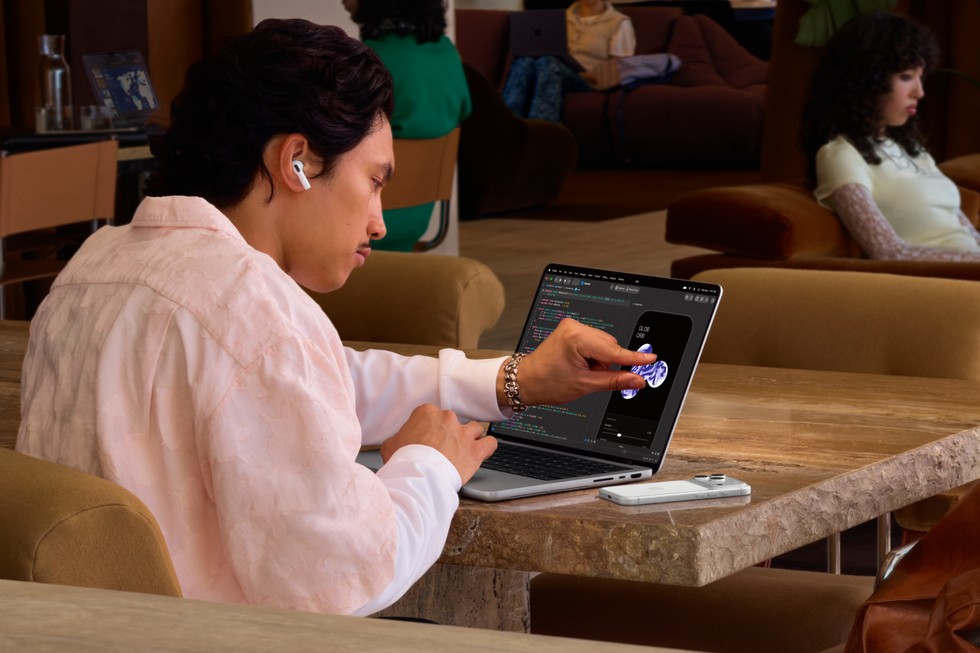
Apple has finally brought a touchscreen to the Mac. The new MacBook Pro with PROLED XDR Display pairs Multi-Touch support with a tandem OLED panel, M5 Pro or M5 Max chips and a redesigned, lighter chassis. Preorders opened October 28, and the laptops begin arriving November 6.
The headline feature is important, but so is the price. The 14-inch model starts at $2,899 with M5 Pro, while the 16-inch version starts at $3,399. M5 Max configurations begin at $4,499 and $4,799 respectively. This is not a touch upgrade for the mainstream MacBook line; it is a premium machine aimed at professionals who can use the new display and high-end performance.
Apple’s touchscreen MacBook Pro pricing
Apple sells four starting configurations of the new design:
- 14-inch with M5 Pro: $2,899
- 16-inch with M5 Pro: $3,399
- 14-inch with M5 Max: $4,499
- 16-inch with M5 Max: $4,799
Education prices start at $2,749 for the 14-inch M5 Pro and $3,199 for the 16-inch. Apple is accepting orders in 30 countries and regions, including the United States, with store availability scheduled for November 6.
The distinction from Apple’s other current pro laptop matters. The standard 14-inch MacBook Pro with M6 starts at $1,999 and retains a conventional non-touch Liquid Retina XDR display. We covered the M6 MacBook Pro changes here. Buyers are therefore choosing between a newer base processor at a lower price and the PROLED model’s touch display, higher-tier M5 chips and expanded professional features.
Touch arrives without turning the Mac into an iPad
The display supports Multi-Touch gestures for scrolling, pinching to zoom, dragging files and arranging windows. Apple says the touch sensor is integrated into the display panel rather than added as a separate layer, an approach intended to reduce latency. A redesigned hinge is supposed to remain stable when the screen is pressed.
Apple is also optimizing its own creative software for touch. Examples include playing a virtual keyboard in Logic Pro, placing clips in Final Cut Pro and drawing directly in Pixelmator Pro. The company says macOS can translate touches into clicks for existing apps, while new system APIs let developers create more deliberate touch controls.
This is still a traditional clamshell laptop. Apple has not announced a 360-degree hinge, detachable keyboard or tablet mode, and it does not list Apple Pencil support. People expecting an iPad Pro that runs macOS should adjust their expectations. Touch is an additional input method alongside the keyboard and trackpad, not a replacement for them.
The tandem OLED display may be the bigger upgrade
Apple calls the screen PROLED XDR, but the underlying change is tandem OLED. It uses two self-emitting pixel layers to improve brightness and contrast while avoiding the backlight blooming that can appear around bright objects on mini-LED displays.
The published specifications include a 10,000,000:1 contrast ratio, adaptive refresh rates from 10Hz to 120Hz and support for both P3 and Adobe RGB color gamuts. Apple quotes up to 1,000 nits sustained full-screen brightness and peaks of 2,000 nits for HDR content or outdoor SDR use. A nano-texture glass option is available for buyers who need more glare reduction.
Those specifications are most relevant to photographers, video editors, designers and other people whose work depends on display accuracy. Ordinary office users will still notice deeper blacks and smoother motion, but those benefits alone may not justify the premium.
OLED also brings a familiar long-term question: image retention. Apple says its display engine monitors and adapts pixel usage over time, but it has not provided detailed public guidance about burn-in behavior or panel-replacement costs. Independent long-term testing will be more useful than launch-day demonstrations on that point.
Dynamic Island replaces the MacBook notch
The new display uses a Dynamic Island around the camera cutout. It can show Spotlight, Live Activities, media controls and Siri AI, expanding and contracting in a way similar to recent iPhones. Apple also uses it for AirDrop requests and incoming calls.
Whether that improves daily work depends on app support and how often users interact with live information. The cutout still occupies display space, but the software integration gives it a purpose beyond housing the camera.
The camera remains a 12-megapixel Center Stage unit. Apple says video stabilization can reduce motion caused by touching the display during a call, which addresses one practical problem created by the new input method.
M5 Pro and M5 Max power the new design
The touchscreen models use M5 Pro and M5 Max rather than the M6 chip in the less expensive 14-inch MacBook Pro. Apple positions M5 Pro for software development, engineering, science and multi-stream 8K video work. M5 Max is aimed at larger 3D, visual-effects, music and local AI workloads.
Memory configurations reach 128GB, and storage now goes as high as 16TB on eligible M5 Max configurations. Apple says the GPU includes Neural Accelerators in every core, enhanced shader hardware and third-generation ray tracing. These are manufacturer performance claims; we have not tested the machines or compared sustained workloads.
The chip naming may confuse shoppers. A higher generation number does not automatically make the base M6 model faster than every M5 Pro or M5 Max configuration. Core counts, memory bandwidth, thermal limits and the specific application all matter. Buyers should compare their actual software requirements rather than choosing only by the number in the chip name.
A lighter chassis without losing the useful ports
The 14-inch model weighs 3 pounds, about half a pound less than its predecessor depending on configuration. The 16-inch weighs 4 pounds, a reduction of roughly 0.7 pounds. Apple says the OLED display stack enables a thinner lid, while a redesigned cooling system maintains sustained performance and directs heat away from the screen.
Port selection remains strong. Both sizes include three Thunderbolt 5 ports, HDMI, an SDXC card slot, MagSafe 3 and a 3.5mm headphone jack. M5 Pro models support up to three external displays, while M5 Max can drive up to four. Wi-Fi 7 and Bluetooth 6 come through Apple’s N1 wireless chip.
The six-speaker system receives new woofers and tweeters, with Apple claiming 50 percent deeper bass. The company also added audio tuning for closed-lid use with an external display.
Battery claims depend on the configuration
Apple advertises up to 24 hours of battery life across the family, but its detailed specifications vary by model and chip. For the 14-inch version, Apple lists up to 22 hours of video streaming with M5 Pro and up to 20 hours with M5 Max, plus shorter estimates for wireless web use. Battery life will also change with screen brightness, touch use, external displays and demanding workloads.
Fast charging can reach 50 percent in about 30 minutes with a sufficiently powerful USB-C adapter. Apple sells 70W, 96W and 140W adapters separately, so buyers should check what is included with their chosen configuration rather than assuming every model ships with the fastest option.
What remains unclear before reviews
Several questions need independent testing. Touch latency, hinge movement, fingerprints, palm rejection and app behavior will determine whether the feature is useful beyond demonstrations. Reviewers also need time to evaluate OLED uniformity, image retention, battery life and sustained performance under heat.
Apple has named a long list of third-party apps expected to support touch, including Adobe Lightroom, DaVinci Resolve, Blender, Microsoft Office, Notion and Zoom. Availability and the depth of those integrations may vary, and some updated apps are described as coming later in the year.
Repairability is another unknown. A highly integrated OLED touch panel could be expensive to replace after accidental damage. Apple says the computer is designed to be durable and repairable, but it has not published consumer repair pricing for the new display.
Who should buy the touchscreen MacBook Pro?
The clearest buyers are professionals who can benefit from both the display and the computing power: colorists, photographers, illustrators, musicians, 3D artists and developers testing touch interfaces. For them, a calibrated OLED panel, direct manipulation and high memory limits can support paid work.
It is harder to recommend for students, general office users or people who mainly browse, write and stream video. The $1,999 M6 MacBook Pro—or a MacBook Air—will cover those jobs for substantially less. A separate iPad may also provide a better touch and stylus experience for users who do not need one device to handle everything.
Existing M5 Pro and M5 Max owners should wait for reviews unless touch or OLED directly changes their workflow. The processor generation is not new, and the cost of upgrading is difficult to justify on the display alone.
The practical takeaway
Apple’s first touchscreen MacBook Pro is a genuine platform change, not a minor refresh. It adds a strong tandem OLED display, lighter hardware, Dynamic Island and touch controls without removing the ports or trackpad that professional users rely on.
Its weakness is positioning. At $2,899 and up, Apple is asking buyers to pay professional-workstation prices for benefits that will be valuable to a narrower group than the headline suggests. The smartest decision is to identify a specific touch or display workflow before ordering. If that use case is not obvious, the less expensive M6 MacBook Pro is likely the more sensible purchase.