Microsoft Edge can now skip an unnecessary Windows process when it opens, giving the browser a faster and more consistent launch on supported Windows 11 PCs. Microsoft announced the change on October 29 and says most eligible users should see a 15% improvement, with gains of up to 33% when the computer is busy with other work.
Those numbers sound like a broad browser-speed upgrade, but the scope is narrower. Accelerated app launch improves a “warm” launch—when Edge is already running or has background processes available. It does not make the browser’s first cold start after a reboot 33% faster, and Microsoft has not published an absolute time saving in milliseconds.
The update is still meaningful because it removes operating-system work that did not need to happen. It also previews a Windows capability that could eventually make other browsers and single-instance apps feel quicker.
What Microsoft changed
When someone clicks the Edge icon, selects Edge from Start or opens a supported link, Windows normally has to determine whether the browser is already running. Under the older path, Windows starts an intermediary process, checks for the existing Edge instance and forwards the launch request to it.
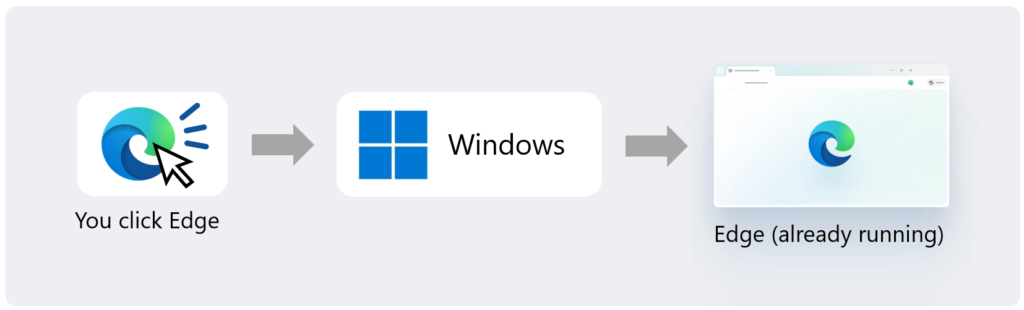
With accelerated app launch, the running Edge process registers itself with Windows. The next supported launch request can then be delivered directly to that process instead of creating the temporary middleman.
Microsoft illustrates the new path in its official Edge announcement. The optimization does not change the web page being opened or add more rendering performance after the browser window appears. It shortens the path Windows uses to bring the existing browser process forward and handle the new request.
The 15% and 33% claims need context
Microsoft says most Windows users will see a 15% launch-speed improvement and that gains can reach 33% under heavy multitasking. These are Microsoft’s measurements, not results from independent testing conducted by Gadget N Widget.
The company’s footnote narrows the comparison further: it measures Edge with accelerated app launch against Edge without it when the browser is already running. That is a warm-launch test, not a cold start from a fully stopped state.
Microsoft has not provided the baseline times behind the percentages. A 33% reduction can look impressive, but the practical feeling depends on whether the original delay was several hundred milliseconds or several seconds. Faster response should be easiest to notice on a busy PC where Windows would otherwise take longer to create the temporary process.
Who can use accelerated Edge launches
The feature requires Microsoft Edge version 150 or later. Microsoft lists Windows 11 versions 25H2, 26H1 and 26H2 as supported when the appropriate October 2026 non-security update or a later update is installed.
For Windows 11 25H2 and 26H2, Microsoft identifies the October 28 preview release as KB5127936. The 26H1 branch has its own October update package. The simplest consumer path is to use Settings > Windows Update and install the applicable update offered for the PC rather than downloading a package meant for a different Windows release.
Microsoft’s KB5127936 support page describes the update as a preview release. That means a user may need to look under Advanced options and Optional updates if it has not yet arrived through the normal monthly update path.
Where the faster path works
Microsoft says accelerated launches work from the Start menu and taskbar, as well as for supported links that use Edge as their default handler. The optimization is most relevant when Edge is visibly open or remains available through a background feature such as Startup Boost.
It does not cover every way an application can be started. Microsoft’s developer documentation says the broader Windows mechanism is intended for single-instance applications and does not support every launch source, Windows version or activation type.
Microsoft is also working on using the faster path when opening PDF files, but the October 29 announcement describes that as future work rather than a finished feature. Users should not assume every PDF launch already receives the same improvement.
Warm launch is not the same as cold start
A cold start happens when no suitable Edge process is running, such as the first time the browser opens after Windows starts and before background preparation has completed. Windows still needs to load Edge’s code, libraries, profile data and interface in that situation.
A warm launch begins with an existing Edge process. Even if every visible window has been closed, Startup Boost may keep core processes ready in the background. Accelerated app launch makes it faster for Windows to communicate with that ready instance.
This distinction also explains why turning off Edge background activity could reduce how often the optimization applies. Some users deliberately disable Startup Boost or background extensions to save memory. That remains a valid choice, but it trades some launch readiness for fewer background processes.
Does this make browsing faster?
The update targets the time between requesting Edge and seeing its existing process respond. It does not increase internet speed, reduce a website’s server delay or automatically make complex pages render faster.
Once the browser is open, page performance still depends on the processor, memory, connection, extensions, site code and Edge’s rendering engine. Accelerated launch is best understood as a responsiveness improvement at the front door, not a new benchmark result for the entire browsing session.
It also does not mean every user will notice a dramatic difference. On a fast PC with little running in the background, the intermediary process may already finish quickly. Microsoft specifically says the largest gains appear under heavy multitasking.
Other browsers could benefit later
Edge is the first browser to use the Windows capability, but Microsoft says it is contributing the work to Chromium. Chrome, Brave, Vivaldi and other Chromium-based browsers could therefore adopt compatible accelerated launches in the future.
Contribution does not mean those browsers receive the feature immediately. Their developers still need to review, integrate, test and ship the relevant code, while Windows must support the requested launch path. Microsoft’s developer documentation also shows that applications must register a running instance and handle the accelerated activation correctly.
The broader idea is not limited to browsers. Other single-instance Windows apps that stay open or run in the background could potentially skip the same intermediary-process step, provided their developers implement the required support.
Should you install the preview update for this?
Faster Edge launches alone are unlikely to justify rushing an optional preview update onto a critical PC. Preview releases contain fixes and new features before the changes move into the regular security-update cycle, and they can have known issues.
People who value stability can wait for the normal Windows rollout. Those already planning to install the October preview should confirm their Windows version, review Microsoft’s known-issues section and keep a current backup before updating.
There is no separate switch that Microsoft tells consumers to enable for accelerated Edge launches. If the PC has a supported Windows build, the applicable update and Edge 150 or later, the browser and operating system handle the registration in the background.
The practical takeaway
Microsoft has improved Edge by removing a redundant process from common warm launches. The design is sensible: when Edge is already running, Windows can contact it directly instead of starting another process simply to locate it.
The result should make Edge feel more responsive, especially on a computer under load. But the headline “up to 33% faster” should not be mistaken for a universal browser-speed gain. It applies to a specific launch scenario, requires current Windows and Edge versions, and still needs independent testing across different hardware.
The bigger story may be what comes next. If the Windows capability spreads to other Chromium browsers and everyday apps, a small Edge optimization could become a wider reduction in the delays people experience throughout Windows 11.