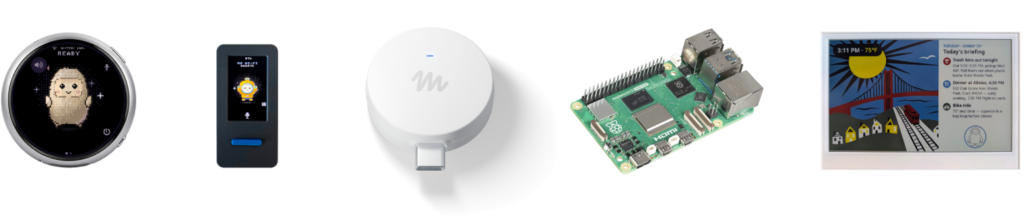
Meta is opening a new route into AI hardware that does not begin with buying a finished device. The company’s new Muse Gadgets project gives makers open-source software for connecting its Muse AI agent to inexpensive development boards, displays, microphones, buttons, sensors and other components.
The idea is deliberately broad. Meta says an off-the-shelf ESP32 board can become a compact voice-and-screen gadget, while a Raspberry Pi or another Linux computer can connect Muse to software such as Home Assistant. Suggested projects include a color E Ink briefing display, a pocket-size status screen and, eventually, an HDMI stick that can place Muse on a television.
What Meta has actually released
Muse Gadgets is not a single product or a new retail hardware line. It is a collection of device software, documentation and examples aimed at people comfortable building and configuring their own electronics.
The public Muse Gadget SDK repository currently includes separate ESP32 and Linux folders, sample skills, setup instructions and firmware. Meta has licensed the main SDK and firmware under Apache 2.0, although some bundled third-party files retain their own licenses and the license does not cover Meta’s Jollybot avatar.
The two main paths serve different projects:
- ESP32 Device SDK: intended for small, inexpensive embedded boards. Builders can add a screen, audio input and output, physical controls or sensors.
- Linux Device SDK: intended for a Raspberry Pi or another Linux machine. Meta specifically points to system-administration tasks and Home Assistant integrations as possible uses.
Pairing is handled through the Muse mobile app on iOS or Android. Builders must first obtain an SDK token, enable Developer mode in the app, and then look for a device whose name begins with “MuseGadget.” That requirement means this is still tied to Meta’s Muse service rather than being a fully independent local AI platform.
The Home Link is Meta’s reference gadget
Alongside the do-it-yourself software, Meta designed Muse Home Link as an example of what the system can do. The USB-C-powered box connects Muse to a home Wi-Fi network, allowing community-built skills to reach compatible devices or anything exposing a local HTTP API.
Meta lists examples such as turning on a light, controlling a television and sending a document to a printer. The exact capabilities will depend on a user’s network, devices and installed skills; Home Link does not automatically make every smart-home product compatible.
The company says Home Link is free for active Muse subscribers in the United States, limited to one per subscriber, with October shipping on a first-come, first-served basis. Meta product executive Nat Friedman said 5,000 units were made, according to reports from The Verge and TechCrunch. Meta’s claim page describes joining the line as holding a place rather than placing an order, so availability should not be treated as guaranteed.
Why this could matter to makers
AI assistants usually arrive inside hardware whose shape and functions were selected by the manufacturer. Muse Gadgets flips that model around: the developer chooses the display, controls, enclosure and purpose, then connects those pieces to the assistant.
That flexibility could make niche projects practical without requiring a team to build an entire conversational system. A kitchen display could show a shopping list, a desk device could surface reminders, or a wall panel could act as a voice front end for home automation. The project examples already cover widely available boards and displays, which should make prototyping more approachable for experienced hobbyists.
The open repository also gives developers a clearer view of the device-side code than a closed consumer gadget normally provides. Builders can inspect the firmware, contribute changes and adapt support to new boards. At the time of publication, however, the repository is young, with limited documentation history and a small number of open issues and pull requests. Its long-term value will depend on how actively Meta and outside contributors maintain it.
The important limitations
This release should not be confused with a polished smart speaker or a plug-and-play Home Assistant integration. Meta explicitly frames Muse Gadgets as experimental, “by hackers, for hackers,” and warns about bricked boards, voided warranties and electrical problems. Anyone building a mains-powered device or connecting to appliances should understand the hardware risks and use appropriate isolation and safety practices.
There are privacy questions, too. A microphone-equipped gadget linked to a personal AI agent may handle conversations, home-control requests and other sensitive context. Builders should review Muse’s privacy policy, the Gadget SDK terms and the permissions of every community skill before giving a prototype access to cameras, microphones, local services or smart-home controls.
Finally, “open source” applies to the device SDKs and firmware, not necessarily the entire Muse service. The assistant, account, SDK token and cloud-side behavior remain Meta-controlled dependencies. A project could therefore stop working or change behavior if Meta alters access, pricing, supported regions or APIs.
Who should pay attention
Muse Gadgets is most relevant to Raspberry Pi enthusiasts, embedded developers, smart-home experimenters and designers exploring new AI interfaces. It is less suitable for shoppers who want a finished appliance with guaranteed compatibility and support.
The practical takeaway is that Meta is treating Muse as a platform that can move beyond phones and first-party devices. The software is available now, while individual builds require their own components and technical work. Home Link offers a more finished example, but its limited U.S. giveaway and subscription requirement make it a showcase rather than a mass-market launch.
Featured image: Meta/Muse Gadgets. The official image shows supported example hardware, including an E Ink display, compact touchscreen devices, Muse Home Link and a Raspberry Pi.