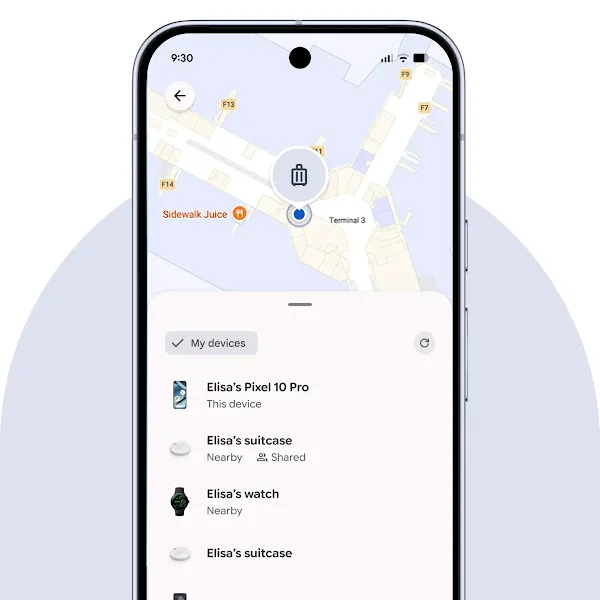
Google is turning Find Hub into a more useful everyday safety net for keys, bags and other tagged belongings. The company’s October 2026 Google System Services notes confirm that Android phones can now use Left-Behind Reminders in Find Hub, while related updates add NFC tag tapping, a more complete registration flow and smoother handling of supported Fast Pair trackers.
The changes are arriving through Google Play services rather than a major Android operating-system upgrade. That matters because compatible phones can gain the new tools through background component updates, although Google has not promised that every feature will appear on every device or in every country at the same time.
What changed in the October Find Hub updates
The newest piece is in Google Play services version 26.41, dated October 19. Google says Find Hub now supports Left-Behind Reminders. The same release also introduces automatic bonding between supported locator tags and their owner, smoother over-the-air firmware updates for Fast Pair devices, and a newer version of the Find Hub Network specification.
Those additions build on Google Play services 26.39, released October 5. That update added NFC support so a phone can open a tag’s details and settings—or help identify a lost tag—when the user taps the phone against it. Google also redesigned the registration flow so owners can choose a category, rename a tag and configure features such as Left-Behind Reminders during initial setup instead of hunting through the app afterward.
Together, the two releases improve both ends of the experience: setting up a tracker should require less cleanup later, while the new reminder can warn the owner before a tagged item becomes genuinely lost.
Why Left-Behind Reminders are the useful part
A map is helpful after an item disappears, but prevention is better. A left-behind alert is designed for the moment when a phone and a tagged possession separate—after leaving a backpack at a café, for example, or walking away from a suitcase at a station. The exact timing and reliability will depend on the phone, tag, signal conditions and Google’s rollout, but the practical goal is straightforward: prompt the owner while returning for the item may still be easy.
This is particularly relevant because Find Hub covers more than phones. Google’s official Find Hub overview lists compatible tracking tags, earbuds, headphones, watches and other accessories, and says users should look for the “Works with Android” badge. The company says the crowdsourced Find Hub network requires Android 9 or later, Bluetooth and location services. Some features and accessories have additional hardware, account, age, market or carrier requirements.
Owners should also distinguish ordinary Bluetooth network finding from precise nearby finding. Google says directional “Find nearby” guidance requires both an Ultra Wideband-compatible phone and an Ultra Wideband-compatible tag. A standard compatible Bluetooth tag can still appear in Find Hub and ring when nearby, but it will not automatically gain UWB precision from this software update.
NFC tapping makes an unfamiliar tag easier to handle
The NFC addition has two practical uses. An owner can tap a supported tag to reach its details and settings quickly. Someone who finds a lost compatible tag can use the same action to identify it, subject to the information and lost-item options the owner has made available.
That reduces dependence on knowing which app or menu to open. It also gives tag makers a simple physical interaction that works even when a person encounters a tracker they did not set up. NFC support in the phone and tag is still required, so this should not be read as a promise that every existing Find Hub accessory will work the same way.
Google’s revised setup flow is less dramatic but just as welcome. Naming a tag “camera bag” or “house keys” and choosing its category during pairing makes later alerts easier to understand. Enabling the reminder at setup also addresses a common weakness of optional safety features: users often never discover them after closing the first-run screens.
Availability, privacy and remaining questions
Google System Services updates roll out independently from monthly Android security patches. Owners can check their Google Play system update in Android settings and keep the Find Hub app current, but seeing Play services 26.41 does not guarantee that every server-controlled feature is immediately enabled. Device makers can also arrange settings differently, and Google notes that some system-service features may be experimental or limited to certain users.
Find Hub’s official page says device-location data used for offline finding by the crowdsourced network is encrypted with the Android device’s PIN, pattern or password. Android also provides unknown-tracker alerts when an unfamiliar Bluetooth tracker appears to be traveling with someone. Those protections are important, but users should still review location sharing, lost-item contact information and reminder settings rather than assuming the defaults match their preferences.
Google has not provided a universal compatibility list specifically for Left-Behind Reminders, nor has it detailed how large the separation threshold is or whether trusted locations can suppress alerts. Support may therefore vary among tag models as manufacturers adopt the newer network specification and firmware path.
What Android tracker owners should do now
Anyone already using a Find Hub tag should look for a Left-Behind Reminders option in that item’s settings, verify that Bluetooth and location access are enabled, and install any offered tag firmware update. New buyers should confirm that an accessory carries the “Works with Android” badge and check whether features they care about—NFC, UWB precision, a replaceable battery or rechargeable hardware—are actually listed for that model.
The update does not reinvent item tracking, but it closes several gaps that affect daily use. Faster setup, tap-to-open tag information and preventive alerts make Find Hub less of an emergency-only map and more of a background tool for avoiding the loss in the first place.
Image credit: Official Android Find Hub product image © Google LLC.