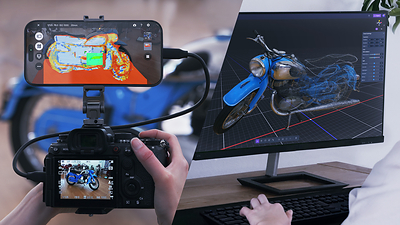
Sony has opened its XYN Spatial Capture Solution to customers in the United States and Canada, expanding the professional 3D-creation platform beyond its earlier limited rollout. The bigger change is not simply availability: XYN can now build 3D computer-graphics assets from individual objects as well as rooms and outdoor spaces.
The system is aimed at film crews, game developers, virtual-production teams, product designers and other creators who need reusable digital versions of real places or props. It combines guided photography, cloud processing and a renderer for production environments. It is not a one-tap phone scanner, and the practical cost depends heavily on how many assets a team generates and at what quality.
What Sony XYN does
XYN uses a series of photographs to reconstruct a real object or environment as a 3D asset. Sony says its Venus processing algorithm can preserve fine detail, reflections, gloss and transparency, although those are manufacturer claims rather than results we have independently tested.
The workflow starts with a compatible iPhone mounted alongside a supported Sony mirrorless camera. The phone provides guidance while the camera captures the source images. Those images are uploaded to Sony’s cloud service, where users choose generation quality and color settings before spending tokens to create the asset.
This is closer to a managed photogrammetry and rendering workflow than a casual smartphone app. Sony lists a mirrorless camera, smartphone, computer and USB cable among the equipment needed to get started.
Three applications make up the workflow
The package is divided into three connected tools:
- XYN Spatial Scan Navi is the iPhone app that guides the shoot. Its Object: Assist Mode helps define the scan area and prompts the operator to keep a consistent distance while moving around the subject.
- XYN Spatial Scan is the browser-based cloud application that processes the uploaded photographs and generates the 3D asset.
- XYN Spatial Renderer Plugin displays and adjusts the resulting asset in virtual-production workflows.
The renderer supports Unreal Engine, Disguise RenderStream and Aximmetry. Sony also highlights splat editing, splat processing and flicker suppression, with support for green-screen stages and LED-wall production.
Object scanning is the important update
Earlier versions of XYN concentrated on environments and virtual-production backgrounds. The new object workflow broadens the appeal to props, consumer products, vehicles and larger industrial subjects. A production team could, for example, digitize a hard-to-transport prop, preserve a location for later reshoots or create a product model for visualization.
Users can specify the portion of an image set that becomes the object. Sony says the output can be viewed on computers and compatible phones or prepared for large LED displays with HDR and color-management support.
There are limits. Sony notes that Object: Assist Mode has restrictions on the size of subjects it can guide, without describing every boundary in its announcement. Difficult materials such as glass, chrome and highly reflective surfaces remain a meaningful test for any image-based reconstruction system, so buyers should treat Sony’s quality claims as a reason to evaluate sample projects—not as a guarantee for every object.
Plans range from free to $209.05 per month
Sony offers four plans in the U.S. The free tier costs $0 per month and includes no generation tokens. Creation 500 costs $20 per month and includes 500 tokens. Creation 2000 costs $67.32 per month with 2,000 tokens. Creation 2000 + Renderer costs $209.05 per month, includes 2,000 tokens and unlocks the renderer for commercial work.
Extra tokens cost $20 per 500 on the free plan, with discounted top-ups on the paid tiers. Tokens expire six months after they are granted and are non-refundable. Paid subscriptions renew automatically unless canceled.
Sony’s own pages disagree on whether the displayed prices include tax: the launch announcement labels its table as tax-inclusive, while the current pricing page says prices exclude tax. Buyers should treat the live checkout and Sony’s current pricing page as the final source for their location.
The token math can change the real cost
The monthly fee is only part of the budget. Sony estimates token use from a typical 110-image project at roughly 150 tokens for Basic quality, 200 for Enhanced, 1,700 for Advanced and 2,000 for Extreme. The company estimates processing times of about 15 minutes, 30 minutes, one hour and three hours, respectively.
On those estimates, a 500-token plan could produce around three Basic assets or two Enhanced assets, but not one Advanced asset without a top-up. A 2,000-token plan could cover about one Extreme generation. Actual consumption can vary with image count and settings, so teams comparing XYN with desktop photogrammetry software should model a typical month of projects rather than compare subscription prices alone.
All listed plans include 15GB of storage. The free Scan Navi tier is limited to three projects and guided shoots of up to 200 images. Paid plans allow unlimited Navi projects and guidance for up to 500 images.
Hardware and compatibility requirements
The current Navi app supports the iPhone 15 Pro and Pro Max, iPhone 16 Pro and Pro Max, and iPhone 17 Pro and Pro Max, running iOS 18 or iOS 26 or later. A supported Sony Alpha camera is also required for the guided capture workflow. Because camera compatibility can change with app and firmware updates, users should verify their exact body on Sony’s specification page before subscribing.
The cloud service also means a reliable internet connection is part of the workflow. Large image sets can take time to upload, and processing happens on Sony’s infrastructure rather than entirely on a local workstation. That may be convenient for small teams, but organizations handling confidential sets or unreleased products should review the service terms and data policies before sending production imagery.
Who XYN is for
XYN makes the most sense for professionals who already use Sony cameras and need 3D assets for film, games, virtual production, digital twins, archiving or product visualization. The guided capture app could reduce missed angles during a location scan, while the cloud service removes the need to configure a powerful local reconstruction machine.
It is less compelling for hobbyists who want occasional low-cost scans, Android users, or studios already invested in another capture and processing pipeline. The renderer’s highest-tier pricing also makes it a specialized production tool rather than a general consumer add-on.
What remains unknown
Sony has not published independent quality comparisons against established photogrammetry packages, and real-world results will depend on lighting, lens choice, image coverage and subject material. The 15GB storage ceiling may also be tight for teams retaining many source sets and completed assets.
The company plans to begin rolling out experimental “Lab apps” by the end of 2026 so creators can test features and algorithms still in development. Sony says feedback from those trials will inform future updates, but it has not guaranteed which experimental capabilities will become permanent products.
For now, the practical takeaway is straightforward: XYN is a more complete and accessible production service than Sony’s earlier prototype, and object capture makes it useful beyond virtual backgrounds. Its value will depend on whether guided shooting and cloud processing save enough production time to justify the camera requirements, token consumption and recurring subscription.