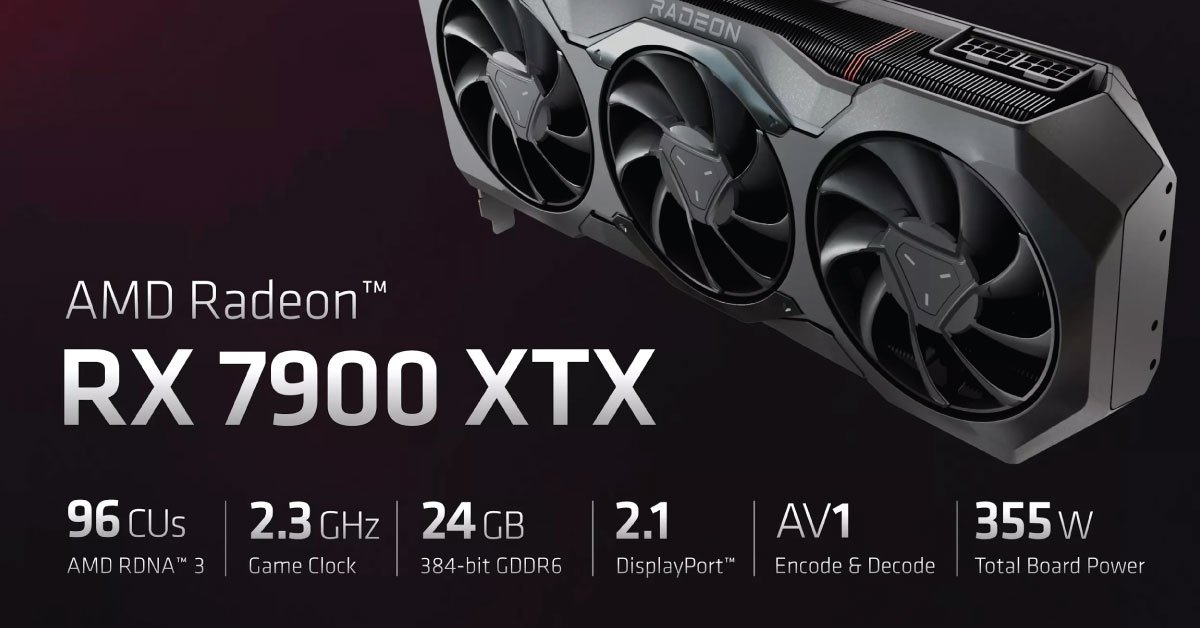
AMD documents the Radeon RX 7900 XTX with 24GB of graphics memory and a 355W typical board-power figure for its reference specification. Board-partner cards can differ in cooling, dimensions, and power requirements. Those specifications do not establish a universal best gaming card or guarantee compatibility with a particular professional application.
Check the exact physical card
Obtain the full manufacturer and model, then compare length, thickness, slot use, and cable clearance with the case. Include nearby radiator, drive cage, or expansion-card positions. A case supporting a general GPU size may still need a closer check for your assembled layout.
Use the card maker’s power guidance
Check the recommended power supply and connectors for that exact version, along with the rest of your system. Do not treat board power as the total system requirement. Use only the correct power cables for your power supply, following the manufacturers’ instructions; modular cables are not universally interchangeable.
Match software before memory capacity
If you are buying for rendering, scientific work, or AI tools, verify support for the exact application, operating system, and GPU backend. A large amount of memory is not useful if the required software path does not support the card. For gaming, compare disclosed tests at your intended resolution and settings.
A used-card inspection
Ask about repairs, modification, warranty transfer, and return terms. Check outputs and stability under an appropriate representative task during the allowed trial. An idle desktop image does not show behavior under load. Do not accept an unexplained benchmark screenshot as proof of the offered card’s condition.
Choose the complete fit
The right decision combines software compatibility, observed performance evidence, physical fit, power requirements, and the actual price. We have not measured frame rates, temperatures, noise, or power consumption and have removed the previous unsupported best-card endorsement.
Sources & method
AI-assisted, source-checked editorial analysis. Manufacturer specifications are distinguished from our suggested buying checks. We have not conducted hands-on testing of this product.