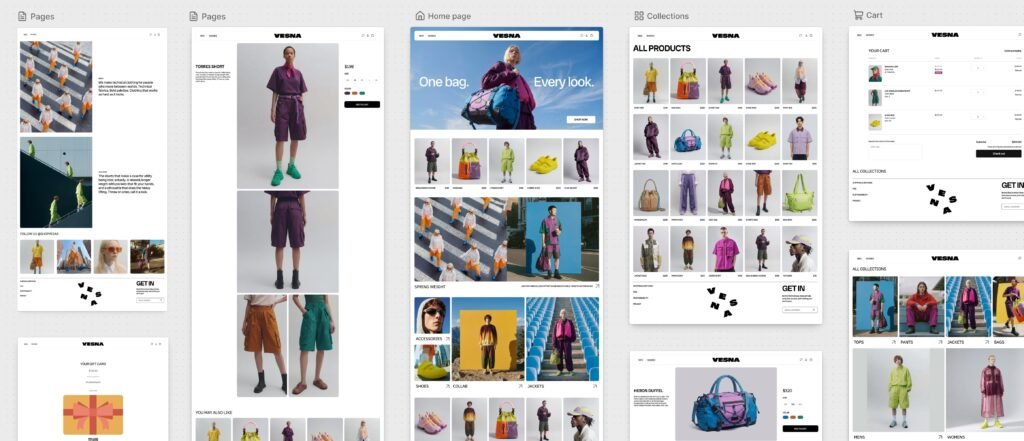
Shopify is rolling out Canvas, a new visual workspace that lets merchants build and redesign an online store by chatting with the company’s Sidekick AI agent. Instead of opening one template at a time or digging through theme settings, users can spread every major store page across a large workspace, describe the changes they want and watch those edits appear in real time.
The October 1 launch could make custom storefront design more approachable for small businesses that cannot hire a developer for every change. But Canvas is explicitly an early-access product, and Shopify’s own documentation lists several important gaps. It is desktop-only, does not support third-party themes at launch and cannot yet use app blocks or app embeds.
What Shopify Canvas does
Canvas presents a store’s pages side by side in one zoomable workspace. A merchant can pan across the entire site to compare the homepage, product pages, collection pages and other templates, then zoom into a particular element for direct editing.
The larger change is the integration with Sidekick. Merchants can give the AI instructions such as changing a hero section, adjusting the store’s overall visual direction or creating a new layout. Sidekick can ask follow-up questions, propose an approach and remember preferences established earlier in the session.
According to Shopify’s announcement, the workspace is rendering the actual theme code rather than showing a nonfunctional mockup. That means merchants can interact with pages, test animation and preview how layouts respond to different products, collections and screen sizes.
Sidekick now works directly with theme files
Shopify says Sidekick can coordinate changes across the templates and files that make up a theme. The company also simplified its theme architecture so the AI can better understand a store’s structure, design rules and logic.
During the building process, Sidekick validates its code and captures screenshots to inspect how its changes look in Canvas. It can then refine the result before presenting it to the merchant. Shopify says Sidekick made more than 25 million theme edits during the first half of 2026, but Canvas expands the system from individual changes into broader store-building and redesign work.
This does not remove manual control. Merchants can still click text, blocks and settings to edit them directly. The practical difference is that they can switch between conventional editing and conversational instructions without leaving the shared visual workspace.
Availability and requirements
Canvas is rolling out over the coming days, but it will initially be available only to selected stores as an early-access feature. Shopify has not announced a separate Canvas price. Its Help Center says the tool is available on plans that include theme customization.
Only desktop devices are supported. Staff members also need permission to edit theme code before they can open Canvas. The tool works with themes developed by Shopify and with custom themes, but not third-party themes purchased or installed from other developers.
That last restriction is significant. Many established stores depend on a third-party theme and a collection of storefront apps, so Canvas may be more useful initially for a new store or a controlled experiment than for immediately rebuilding a busy production site.
The biggest launch limitations
Canvas does not support theme app extensions at launch. If a merchant creates or duplicates a theme inside Canvas, app blocks and app embeds will not be available in that theme. Shopify told developers that existing themes and the conventional online store editor will continue to work normally, so merchants do not need to migrate.
Other early limitations include:
- No direct customization for different Shopify Markets.
- No translation editing inside Canvas.
- No normal theme-update delivery for a theme edited in Canvas.
- No downloading the files of a Canvas-edited theme.
- No manual addition or configuration of app blocks and embeds.
- Limited compatibility with some older theme content.
Shopify also says Canvas is not replacing the existing theme editor yet. In its developer community guidance, the company described the product as early and evolving, with broader extension compatibility planned.
Why it matters for small merchants
Traditional no-code store builders make standard layouts easier to assemble, but a distinctive design often still requires custom CSS, Liquid templates or outside help. Canvas tries to lower that barrier by allowing the merchant to describe the desired result while Sidekick changes the underlying theme.
That could make rapid prototyping much faster. A small retailer could explore several homepage directions, compare product layouts or adapt a seasonal campaign without starting each page separately. Seeing the full store at once may also reduce visual inconsistencies that appear when pages are edited in isolation.
However, AI-generated code still needs human review. Merchants should check mobile layouts, accessibility, product variants, navigation, checkout links, analytics and page speed before publishing. A visually convincing preview does not guarantee that every customer flow or third-party integration works correctly.
Should existing Shopify stores use it now?
For eligible merchants, Canvas is worth testing on a duplicate theme rather than the live storefront. It is best suited to exploring a redesign, creating an initial Shopify-built theme or learning how Sidekick translates design instructions into working layouts.
Stores that rely on third-party themes, review widgets, subscription components, upsell blocks or complex regional configurations should wait until compatibility improves. The missing app-extension and Markets support could remove important storefront functionality if a merchant publishes without a careful audit.
The promise is substantial: a store owner can move from an idea to editable, interactive theme code without writing every line. The current release is better understood as an early look at that workflow than a drop-in replacement for a mature Shopify setup.
Featured image: Shopify.