Apple has finally given compatible AirPods a system-wide custom equalizer. With current AirPods firmware and iOS 27, iPadOS 27 or macOS 27, listeners can adjust low, mid and high frequencies instead of accepting Apple’s default tuning or relying on an equalizer inside a single music app.
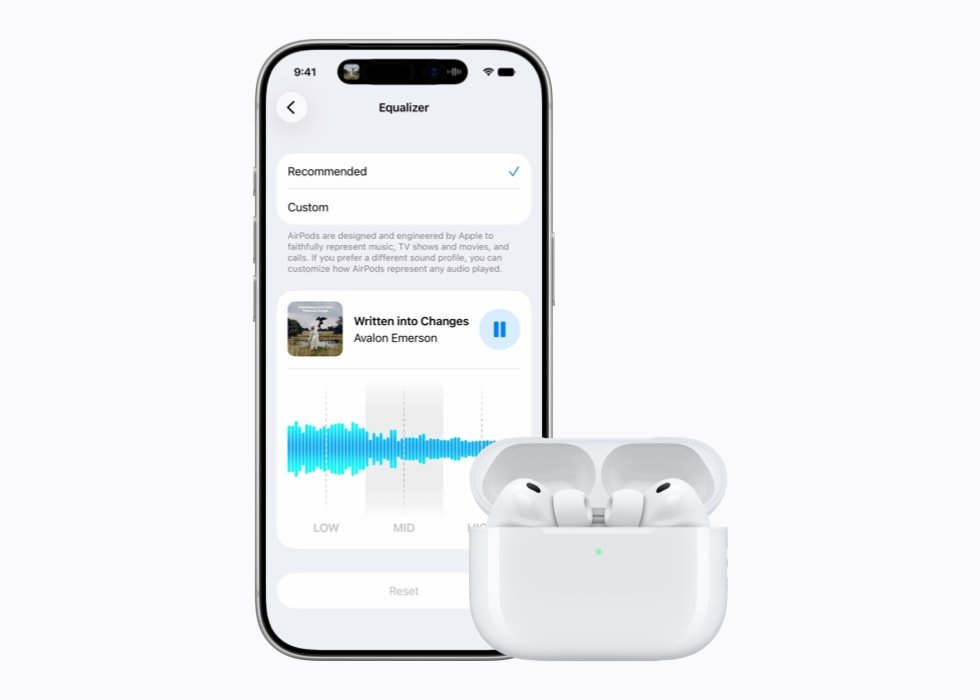
The control arrived through firmware version 9A348 on several existing models. Apple’s newer AirPods 5 line uses version 9A350. The feature was announced at WWDC in June, but the public firmware rollout now makes it available without enrolling in a beta program.
Which AirPods support custom EQ?
Apple’s AirPods firmware release notes say the new Equalizer control works with AirPods 4 and later, AirPods Pro 2 and later, and AirPods Max 2. The compatible lineup therefore includes:
- AirPods 4
- AirPods 4 with Active Noise Cancellation
- AirPods 5
- AirPods 5 with Wireless Charging Case
- AirPods Pro 2 with Lightning or USB-C charging cases
- AirPods Pro 3
- AirPods Max 2
Older hardware misses out. The original AirPods Max, AirPods Pro 1, AirPods 3, AirPods 2 and earlier generations are not listed as compatible. That restriction is important because Apple’s older over-ear headphones remain capable products, but they do not receive the same sound-shaping control.
What the new equalizer actually changes
The AirPods EQ has three broad controls: lows, mids and highs. Raising the low range adds bass weight, adjusting the middle range changes the prominence of vocals and many instruments, and moving the high range affects treble detail and sharpness.
The setting is not limited to Apple Music. It changes how compatible AirPods reproduce any audio, including music from other streaming services, podcasts, video, calls and games. That makes it more useful than the older EQ presets found under the Apple Music settings, which affect only playback inside that service.
The custom profile can also follow the AirPods when they are paired with an iPad or Mac, according to MacRumors’ setup guide. Apple lets users play music while adjusting the controls so they can hear the changes immediately, and a Reset option returns the sound to its original state.
How to find the AirPods custom EQ
After connecting compatible AirPods, open Settings on an iPhone or iPad and tap the AirPods name near the top of the page. Go to Audio & Routing, choose Equalizer, then select Custom. Adjust the low, mid and high points while audio plays, or choose Apple’s recommended profile.
On a Mac running macOS 27, the same type of control is available through System Settings after the AirPods are connected. Menu names can differ slightly between devices, but the Equalizer is part of the AirPods-specific settings rather than the general Music app settings.
If the Equalizer option is missing
AirPods firmware installs automatically; Apple does not provide a normal “Update now” button. To encourage an update, first install the latest operating-system version on the paired iPhone, iPad or Mac and connect that device to Wi-Fi. Put the earbuds in their charging case, connect the case to power and leave it within Bluetooth range for at least 30 minutes.
For AirPods Max, Apple says to connect the headphones over Bluetooth, plug a charging cable into the right ear cup and keep them near the Wi-Fi-connected Apple device for at least 30 minutes.
Users can check the installed version by opening Settings on a paired iPhone, tapping the AirPods name and scrolling to the firmware information. Current versions listed by Apple are 9A348 for AirPods 4, AirPods Pro 2, AirPods Pro 3 and AirPods Max 2, and 9A350 for AirPods 5.
A useful feature with deliberately simple controls
This is a three-band equalizer, not the detailed parametric or multi-band system offered by some enthusiast audio apps. Users cannot precisely target a narrow frequency or build a complicated studio-style curve. The benefit is simplicity: someone who wants a little less bass, clearer dialogue or softer treble can make that adjustment without understanding advanced audio terminology.
It also does not replace Adaptive EQ. Compatible AirPods can continue using Apple’s automatic tuning to compensate for fit and listening conditions, while the custom EQ reflects the listener’s broader tonal preference.
Why this update matters
AirPods have been on sale since 2016, yet Apple long resisted providing a straightforward, device-wide manual EQ. Competing headphones and earbuds from Sony, Bose, Sennheiser and other brands have commonly offered sound profiles through their companion apps.
The new control closes part of that gap and can make an existing pair feel more flexible without buying new hardware. Still, the model restrictions may frustrate owners of older AirPods, especially the first-generation AirPods Max. Apple has not announced plans to bring the feature to those excluded models.
Apple originally previewed custom EQ during WWDC26. A September 25 report from 9to5Mac highlighted its arrival in the current public firmware. Gadget N Widget has not independently measured how the EQ changes frequency response; the available controls and supported models are based on Apple’s documentation and current software reporting.